 Twinspoke
Start with the brief.
One chat holds the whole request. Either agent can lead; in this run Claude did, giving each agent its own set of files.
Launching November 19, 2026
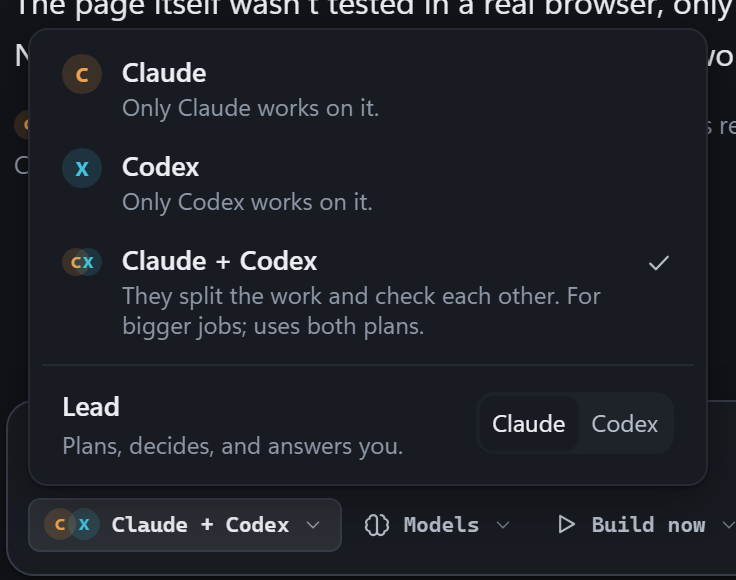
Work with Claude Code, Codex, or both in one local chat. On bigger jobs, the agent you pick as lead splits the files, and the two review each other’s changes.

How it works
We asked for a small expense tracker. Here’s how the two agents divided the job and what the review caught.
One chat holds the whole request. Either agent can lead; in this run Claude did, giving each agent its own set of files.
Claude writes the server and API tests. Codex builds the form and monthly totals. They can message each other as they work.
Codex spots an amount of 0.001 being saved as zero. Claude fixes it and adds a regression test. All ten tests pass.
“Build a small expense tracker web app in this folder… a form, the list, and a running total per month. Add test.js that checks the API.”
server + tests
interface
server.js test.js
index.html app.js style.css
Claude → Codex Server ready for review.
An amount of 0.001 is being saved as zero.
Fixed the amount check and added a test.
Expense tracker example
A thousandth of a dollar is positive. Round it to cents and it becomes zero. Change the amount to see why the order of those two checks matters. This demo runs in your browser.
POST /api/expenses
Result for $0.001
The reviewed version rejects an expense that rounds to zero cents.
The workspace
Read the conversation, open a live preview, or inspect the changes file by file. Use Undo to restore a file to its state before the chat’s changes.
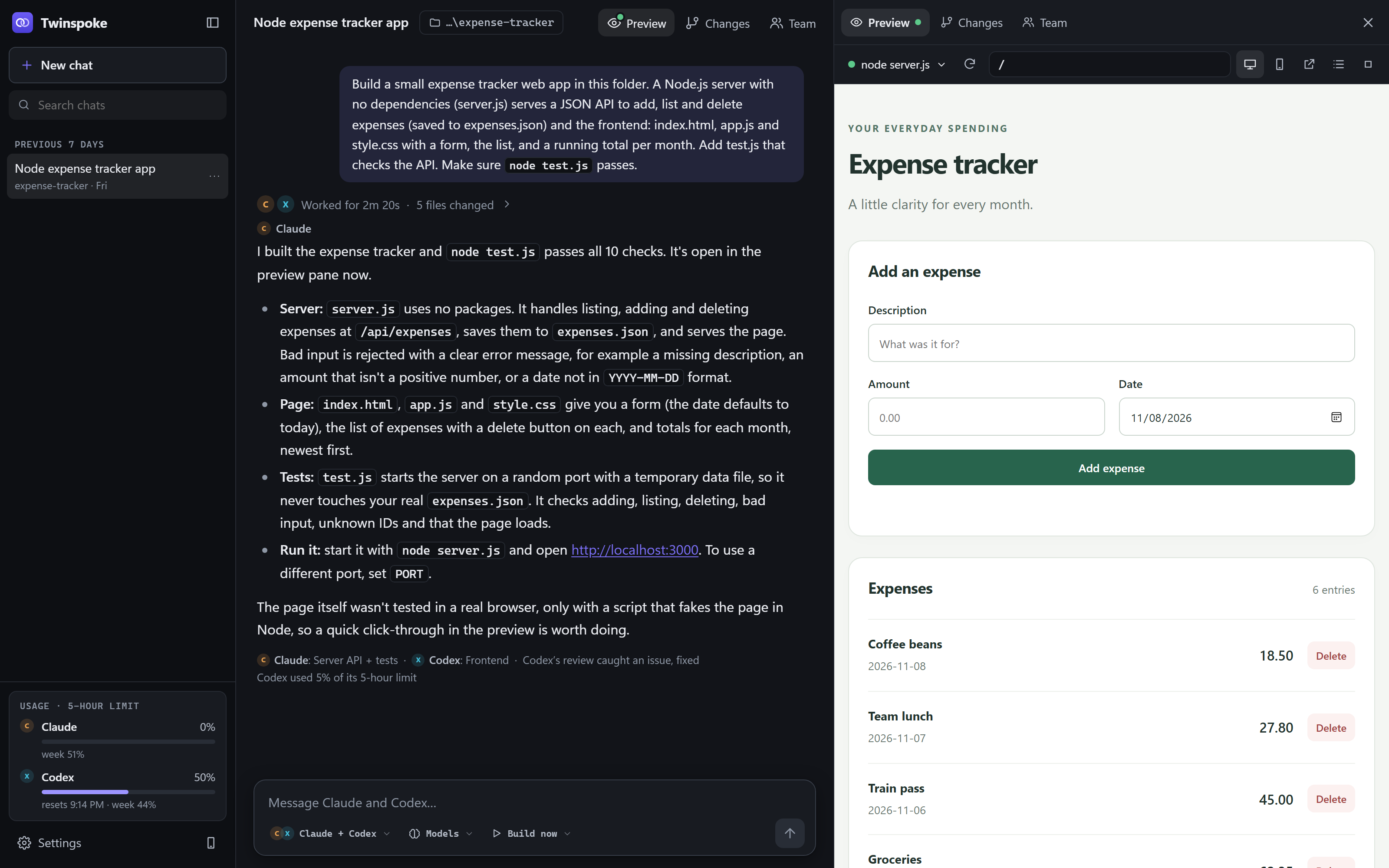
Sign in through Claude Code or Codex as usual. You can start with either agent and add the other later.
See usage and reset times when the agent reports them. If one agent runs out, you can hand the task to the other.
Pair your phone to check the chat while the agents run on your computer.
Pricing
One license covers your own computers. Your Claude and ChatGPT plans are separate.
Sales open November 19, 2026.
Check installation requirements ↓Secure checkout by Stripe. Prices are in US dollars; sales tax or VAT is added at checkout where it applies. By buying, you agree to the License and the Privacy Policy.
Installation
You’ll need Node.js 18 or later and at least one coding agent. The setup guide checks what’s installed and helps you pick a projects folder. By installing Twinspoke you agree to its License. The app collects nothing from your computer: see the Privacy Policy.
FAQ
No. Twinspoke uses Claude Code and Codex as they’re already set up on your computer, signed in with your own Claude or ChatGPT plan. Twinspoke never sees your logins. If you’ve set one up with an API key instead, it keeps using that key.
Twinspoke goes on sale on November 19, 2026, at the $39 launch price. Until then, the install guide below shows what you’ll need.
Twinspoke is $49, once, with a launch price of $39. Every 4.x update is included, and there’s a 30-day money-back guarantee.
Twinspoke itself has no per-message fees. The agents’ work still counts against your own Claude and ChatGPT plans’ 5-hour and weekly limits, just like using Claude Code or Codex on their own, and Twinspoke shows how much of each limit you’ve used. If you’ve turned on paid extra usage for your account, work past a limit can be billed; for Claude, Twinspoke can hold turns at the limit.
Twinspoke stores your chats and projects on your computer. Claude Code and Codex send what they need to their own services (Anthropic and OpenAI) to do the work, exactly as they do when you use them without Twinspoke. Our Privacy Policy has the details.
Yes. With one agent, Twinspoke works like that agent on its own, with Twinspoke’s app around it: chats, the live preview, changes with undo and your phone. Add the other agent whenever you like to get the team.
The one you pick, chat by chat. Choose Claude or Codex as the lead in the message box, or set your usual choice in Settings. The lead plans the work, shares it out and answers you; the other builds its part and reviews.
Twinspoke includes installers for all three and requires Node.js 18 or newer. Windows has been tested on a real machine. The macOS and Linux installers still need that check. On Windows, Twinspoke opens at http://twinspoke.localhost. On macOS and Linux it’s http://localhost:4777. It opens in a window of its own when Chrome, Edge or Brave is installed (or Arc, on a Mac), and in a browser tab otherwise.
In Settings → Phone, turn on phone access and choose Pair a phone. Scan the QR code, or open the address on your phone and enter the six-digit code. It works on your home Wi-Fi, or from anywhere with Tailscale. You can also turn on a public https address through Tailscale Funnel, which still only works for paired phones.
Your computer needs to stay on, since that’s where the agents run.
When an agent reports usage, Twinspoke shows its five-hour and weekly limits and any reset times. Usage warnings appear at 80% and 95%. If one agent runs out, you can carry on with the other one, or wait for the reset.
They’re set up not to. Each task owns its files, and edits to the other agent’s files are blocked before they happen. Edits made with shell commands can’t be blocked that way, so both agents are told to use their file tools, and Twinspoke warns you if it spots a change to someone else’s file.
No. Twinspoke is an independent product. It isn’t affiliated with, endorsed by, or sponsored by Anthropic or OpenAI. It runs the Claude Code and Codex programs you already have.